AI-driven pricing works because it does the math you’re too busy to run every week: it calculates your true floor price per service, flags anything sold below cost, and recommends where to raise rates or add retail. The single next move is a formula-based price audit, fed by your point-of-sale exports and your bookkeeping numbers, not a gut-feel guess at what “seems fair.”
Before you touch your price list, gather three things:
- Your last 90 days of POS data, broken down by service and stylist
- Your QuickBooks profit-and-loss statement, including owner pay as a real cost line
- A list of every service’s average appointment duration and product cost
Once those three feed into a floor-price formula, you’ll see immediately which services are quietly losing money. LumariPRO exists to connect those data sources automatically instead of making you export spreadsheets every quarter.
Key Takeaways
AI pricing works when it’s fed accurate cost, duration, and financial data, then runs the floor-price formula continuously instead of once a year.
| Point | Details |
|---|---|
| Start with the floor-price formula | Calculate cost-per-minute plus product cost and target margin before touching any menu price. |
| Fix markup versus margin confusion | Divide cost by (1 minus target margin) rather than adding a flat markup percentage. |
| Feed AI clean data | Track product usage per service, real appointment durations, and owner salary as a QuickBooks cost line. |
| Prioritize retail attach | Service-aware recommendations can lift attach rates toward the 18 to 20 percent best-in-class range |
| Review on a real cadence | Recalculate nightly, review monthly, and trigger an off-cycle audit after supplier price hikes. |
| Consider an integrated platform | LumariPRO connects POS and QuickBooks data to run these formulas and dashboards for suite renters automatically. |
Table of Contents
- How AI Helps With Salon Pricing Strategy
- What Every Salon Owner Should Know About Pricing Math
- What Data and Integrations AI Pricing Needs to Work
- Turning AI Recommendations Into Retail Revenue and Fuller Chairs
- Run This Pricing Review This Week
- What AI Pricing Changes Actually Look Like in Practice
- Where AI Pricing Tools Run Into Real Limits
- Keeping Client and Financial Data Secure
- How AI Pricing Solutions for Salons Actually Compare
- Adjusting Prices for Seasonal and Regional Demand
- What the Data Actually Tells Suite Renters About Pricing
- How LumariPRO Puts AI Pricing to Work for Suite Renters
- Frequently Asked Questions
- Sources
How AI Helps With Salon Pricing Strategy
AI pricing tools do three things a spreadsheet never will on its own: they run the floor-price math continuously, they suggest demand-based uplifts, and they surface retail opportunities tied to what a client just booked. That third piece matters more than most owners assume, because AI can analyze sales data, customer behavior, and market trends to recommend pricing, promotions, and inventory decisions in ways a manual quarterly review can’t keep pace with.
Here’s what that looks like in practice:
- Flagging any service priced below its calculated cost-per-minute floor before it bleeds margin for months
- Recommending higher rates for a stylist’s peak-demand slots and lower rates or bundled offers during predictably slow hours
- Matching retail suggestions to the service just performed, rather than a generic “ask everyone about shampoo” script
An AI agent connected to salon systems can meaningfully lift rebook rates, waitlist fill, and retail attach, which is the kind of incremental revenue that never shows up on a single invoice but adds up across a full year of appointments.
What Every Salon Owner Should Know About Pricing Math
AI recommendations only earn your trust once you understand the math underneath them. Start with cost-per-minute: take your hourly cost (product, labor, and a share of overhead) and divide by 60. Multiply that by service duration, then build in your target margin. A rigorous floor-price formula built from cost-per-minute, product cost, and target margin keeps you from ever pricing a service below what it actually costs to deliver.
The most common mistake owners make is confusing markup with margin. Markup is added on top of cost; margin is what’s left after cost is subtracted from price, expressed as a percentage of that price. If you want a 40% margin, you don’t add 40% to cost. You divide cost by (1 minus 0.40), which lands closer to a 67% markup. Get that formula backward across your whole menu, and you’re underpricing everything without realizing it.
Three numbers to check monthly:
- Price-per-minute for every service on your menu, compared against your true cost-per-minute
- Margin-per-chair-hour, which tells you which services are actually worth the real estate they occupy
- Retail attach rate and utilization, the two levers that turn a fully booked day into a genuinely profitable one
Pro Tip: Run the cost-per-minute formula on your three highest-volume services first. If even one of them is underpriced, that error is compounding every single week.
What Data and Integrations AI Pricing Needs to Work
AI pricing recommendations are only as good as the inputs behind them. Feed the system garbage numbers, and it will confidently hand you a garbage price.
You need four data inputs at minimum:
- Product cost used per service, tracked consistently, not estimated
- Actual appointment durations, not the “scheduled” time slot
- Overhead lines broken out by category (rent, utilities, booth fees, supplies)
- Owner salary as its own line item pulled from QuickBooks, not folded into “profit”
That last point trips up more owners than any other. If your own pay isn’t in the cost base, every floor price the system calculates will be too low, because it’s quietly assuming you work for free.
Connecting your point-of-sale system, appointment book, and QuickBooks lets AI reconcile these numbers automatically instead of manually every quarter. In practice, that reconciliation runs on a simple cycle:
- Nightly, the system recalculates floor prices as new transactions and product usage post
- Weekly, it sends alerts on any service that’s drifted below floor or any stylist whose utilization has dropped
- At checkout, it can prompt stylists with a specific retail suggestion tied to the service just completed
The data-quality requirement isn’t optional. Reliable recommendations depend on accurate product usage per service and consistent duration records, and platforms like LumariPRO’s integration layer are built to pull those numbers directly from POS and bookkeeping systems rather than relying on manual entry.
Turning AI Recommendations Into Retail Revenue and Fuller Chairs
Retail is the highest-margin line on a salon’s menu, and it’s also the easiest to leave on the table. AI closes that gap two ways: it recommends specific products tied to the service just finished, and it flags open processing-time windows that could hold a quick add-on service instead of sitting empty.
Think about what actually happens during a 20-minute color-processing gap. That’s dead time for the chair unless something fills it, and AI systems are increasingly good at suggesting a fast brow tint or a scalp treatment that fits the window without disrupting the schedule.
- Service-aware retail suggestions convert far better than generic upsell scripts because they’re tied to what the client just experienced
- Service- and cycle-aware retail recommendations can lift attach rates from typical industry averages toward best-in-class ranges.
- Tracking attach rate per stylist, not just salon-wide, tells you exactly who needs coaching and who’s already closing the gap
That per-stylist visibility is where coaching earns its keep. A dashboard that shows one stylist attaching retail at 18% and another at 6% gives you a concrete conversation to have, instead of a vague reminder to “sell more product” at the next staff meeting.
Run This Pricing Review This Week
You don’t need a consultant to start fixing underpriced services. You need an hour, your POS export, and a calculator.
- Compute cost-per-minute for your five highest-volume services using product cost, labor, and overhead
- Run the floor-price formula on each and compare it against your current menu price
- Flag any service priced below floor and decide whether to raise the price, cut the service, or restructure what’s included
Once the audit is done, three fixes usually apply immediately: introduce tiered pricing for services with wide skill variance, add explicit pricing for add-ons that are currently bundled for free, and update your retail display near checkout to match what’s actually being recommended.
For cadence going forward, check your dashboard monthly, run a full pricing review annually, and treat a supplier price hike or a sustained utilization shift as an automatic trigger for an off-cycle review. A repeatable rhythm of nightly recalculation and monthly review protects both your margin and your client relationships better than sudden across-the-board increases.
Pro Tip: Don’t raise every underpriced service at once. Stagger increases across two or three months so regular clients absorb the change gradually instead of feeling blindsided at their next visit.
What AI Pricing Changes Actually Look Like in Practice
The clearest way to see AI pricing’s impact is to follow one underpriced service through a typical audit. Say a keratin smoothing treatment has been priced at $150 for two years while product cost, chair time, and overhead have all crept upward. Run it through a floor-price calculation and it often comes back needing to sit closer to $185 to hit even a modest target margin, a gap that’s been quietly eating profit on every single booking.

That kind of discovery repeats across menus more than owners expect, particularly with services that involve expensive product lines: keratin treatments, color correction, and extensions all tend to drift below floor first, since product costs rise faster than owners remember to adjust menu prices.
On the retail side, the pattern shows up differently. A stylist who mentions a specific product by name at checkout, prompted by a system flag tied to the service just performed, converts that suggestion into a sale far more often than one working from memory or a generic script. Multiply that across a full book of clients and a modest per-visit lift becomes a meaningful chunk of monthly revenue, particularly for suite renters who don’t have a retail-focused front-desk team pushing product for them.
Gap-fill offers follow the same logic. A colorist with a 25-minute processing window who gets a system prompt to offer a quick brow service to the client in the next chair captures billable minutes that would otherwise just be downtime. None of this requires a dramatic operational overhaul. It requires the data feeding the recommendation to be accurate and the stylist actually acting on the prompt.
Where AI Pricing Tools Run Into Real Limits
AI pricing isn’t a set-it-and-forget-it fix, and the limitations are worth naming honestly. The biggest one is data quality. If your POS records don’t track product usage per service consistently, or your appointment durations reflect the booked slot rather than the actual time spent, the system’s recommendations inherit those errors and hand them back to you with false confidence.
Client relationships are the second real constraint. A price increase that’s mathematically justified can still land badly if it’s delivered without context, especially with long-tenured clients who remember what they paid five years ago. AI can tell you a price needs to move; it can’t have the conversation with your regular Thursday-at-2pm client for you.
Suite renters and small operations also face a scale problem. Some AI pricing tools are built with multi-location chains in mind, expecting a dedicated staff member to manage integrations and review dashboards. A solo booth renter needs something that works without that overhead, which is a real gap between what’s marketed and what independent professionals can actually use day to day.
Finally, seasonal and regional demand shifts require enough historical data to be useful. A brand-new suite renter with three months of appointment history won’t get the same quality of recommendation as someone with two years of seasonal patterns to draw from. The tool improves with time and consistent data entry, but it isn’t instant, and setting that expectation up front avoids disappointment in month one.
Keeping Client and Financial Data Secure
Any AI pricing tool touching your POS, appointment book, and QuickBooks account is handling sensitive information: client contact details, payment history, and your actual business financials. That’s a meaningful amount of trust to place in a single platform, and it’s worth asking direct questions before connecting anything.
Look for a few specifics: does the platform encrypt data in transit and at rest, does it limit which staff accounts can see full financial dashboards versus just their own booking data, and does it have a clear policy on how long client and transaction data is retained after you cancel a subscription. A platform that can’t answer those questions plainly isn’t one you want holding your QuickBooks login.
Independent professionals face a particular version of this risk. A suite renter often manages their own books with less oversight than a larger salon’s dedicated bookkeeper, which means the pricing platform itself becomes a bigger single point of failure if it’s compromised. Choosing a tool built specifically around beauty-industry integrations, rather than a generic retail analytics product retrofitted for salons, at least narrows the number of unnecessary data connections a breach could exploit.
Ask any vendor directly how client payment data is segmented from general business analytics, and don’t accept a vague answer about “industry-standard security” as a substitute for specifics.
How AI Pricing Solutions for Salons Actually Compare
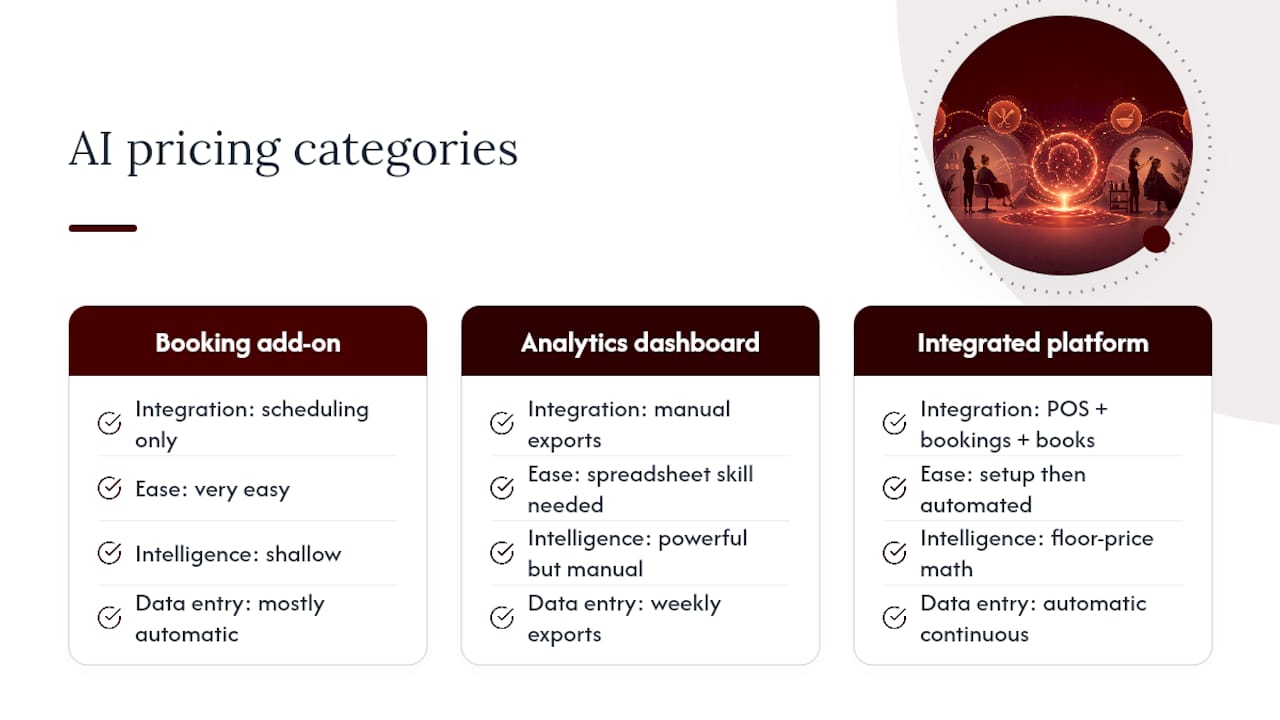
Not every pricing tool available to salons does the same job, and the differences matter more than the marketing copy suggests. Broadly, three categories exist: booking-platform add-ons that layer basic pricing suggestions onto existing scheduling software, standalone analytics dashboards that require manual data exports, and integrated platforms built specifically to connect POS, appointment, and bookkeeping data into one continuous pricing engine.
The first category is convenient if you’re already using that booking platform, but the pricing intelligence tends to be shallow, often limited to flagging no-shows or suggesting generic discount windows rather than running a real cost-per-minute floor calculation. The second category can be powerful in the hands of someone comfortable with spreadsheets, but it puts the integration work back on the owner, which defeats much of the point for a solo suite renter already stretched thin.
The third category, integrated platforms purpose-built around real financial data, is where the actual floor-price math, retail attach tracking, and QuickBooks-fed dashboards live. LumariPRO sits in this category by design, built specifically for suite-based professionals rather than adapted from generic small-business software. For an independent beauty professional deciding where to invest, the question isn’t which tool has the flashiest dashboard. It’s which one actually connects to the systems you already use for booking and bookkeeping, since a pricing tool that requires you to re-enter data manually every week rarely survives past the first busy month.
Adjusting Prices for Seasonal and Regional Demand
Demand for salon services isn’t flat across the calendar, and pricing that ignores that fact leaves money on the table twice a year at minimum. Wedding season drives up demand for updos and color services in spring and early summer. Holiday party season does the same for blowouts and glam services in November and December. A floor-price calculation tells you the minimum you can charge; demand data tells you how much higher than that floor you can actually go during peak weeks.
Regional variation compounds this. A suite renter in a college town sees demand patterns tied to the academic calendar, with slow summers and packed weeks around graduation and homecoming. A salon in a tourist-heavy coastal market sees the opposite rhythm, busy in summer and quiet in the off-season. AI pricing tools that track your own historical booking data, rather than applying a generic industry calendar, catch these local patterns because they’re built from your actual appointment history, not an assumption about what “most salons” experience in March.
The practical application is dynamic discounting for slow periods paired with modest uplifts during predictable peaks. A Tuesday morning slot in a typically slow month might warrant a limited-time discount to fill the chair, while the same slot during your historically busiest three weeks of the year can hold a higher rate without losing bookings. The key input, again, is enough historical data to distinguish a real seasonal pattern from a one-off slow week, which is why the value of these tools compounds the longer you’ve been tracking consistent data.
What the Data Actually Tells Suite Renters About Pricing
Most advice aimed at “salon pricing” is written for multi-chair salons with a general manager and a marketing budget, not for a solo suite renter juggling every role in the business. That mismatch is the real problem, and it’s why so many independent professionals either underprice out of fear of losing clients or overprice based on a competitor’s menu without checking their own cost-per-minute first.
The math doesn’t care about your business structure. A floor price built from real product cost, real chair time, and your own salary as a cost line is the same calculation whether you run a ten-chair salon or a single suite. What changes is who’s supposed to run that calculation every month, and for a suite renter, that’s you, alone, on top of everything else you’re already doing.
That’s the gap AI pricing tools are actually built to close, not by replacing your judgment about client relationships, but by doing the recurring math and data reconciliation you don’t have staff to hand off. The conventional advice to “just review your prices annually” undersells how fast product costs and demand patterns shift within a single year. Prioritize connecting your real financial data first. A pricing recommendation is only as trustworthy as the numbers feeding it, and no dashboard fixes that on its own.
How LumariPRO Puts AI Pricing to Work for Suite Renters
Everything covered above, the floor-price formula, the POS and QuickBooks integrations, the retail attach tracking, is exactly what LumariPRO was built to run automatically for suite-based beauty professionals. The platform connects to your point-of-sale system and QuickBooks account, then recalculates pricing formulas on a nightly basis so you’re never working from stale numbers.
Beyond the pricing math, LumariPRO’s dashboards and coaching tools give you real-time financial visibility, business playbooks written specifically for suite renters, and expert-led guidance when a pricing decision needs more context than a formula alone can provide, as illustrated in this case study on how one salon doubled online bookings. That combination matters because a floor-price number without a plan for delivering it to clients is only half the job.
If you’re deciding between piecing together a spreadsheet and a calculator or connecting a platform that already speaks the language of booth-rent economics, take a look at LumariPRO’s plan details and see which tier fits where your business is right now.
Frequently Asked Questions
What is AI-driven pricing for a salon? AI pricing for salons uses sales, appointment, and cost data to calculate accurate floor prices, recommend rate adjustments by demand, and suggest retail add-ons tied to services clients already book.
How do I calculate a floor price for a salon service? Take your cost-per-minute (product cost plus labor and overhead, divided by 60), multiply by service duration, then divide by one minus your target margin to get the minimum price that protects profit.
Does AI pricing replace the need to understand my own numbers? No. AI automates the recalculation, but you still need to feed it accurate product usage, appointment durations, and your own salary as a cost line, or the recommendations will be built on bad inputs.
How often should I review salon pricing? Run a full review annually at minimum, check dashboard metrics monthly, and treat a supplier price increase or a sustained utilization shift as a trigger for an immediate, unscheduled review.
Can AI pricing tools work for a single suite renter, not just a multi-chair salon? Yes, as long as the tool connects directly to your POS and bookkeeping data rather than requiring manual spreadsheet work. Platforms built specifically for suite-based professionals, like LumariPRO, are designed around that solo-operator reality.
Sources
- AI for my salon — Revlon Professional blog
- How to Price Salon Services: The Formula-Based Guide for Profit (Zenoti)
- OpenClaw Hair Salon AI: Boulevard, Vagaro, GlossGenius Automation & Color-Formula Memory (OpenClaw Consult)
Recommended