Start by building a demand heatmap from three to six months of bookings. It shows exactly where you’re paying stylists to stand next to empty chairs and where you’re turning away clients on a Saturday afternoon. Realign your schedule to that map, and you’ll usually see utilization climb, overtime drop, and fewer clients bounce to a competitor. Track two numbers as you go: utilization rate and booked chair hours.
TL;DR:
- Building a demand heatmap from booking data reveals underused hours and helps realign staffing to maximize chair utilization and reduce client walkaways.
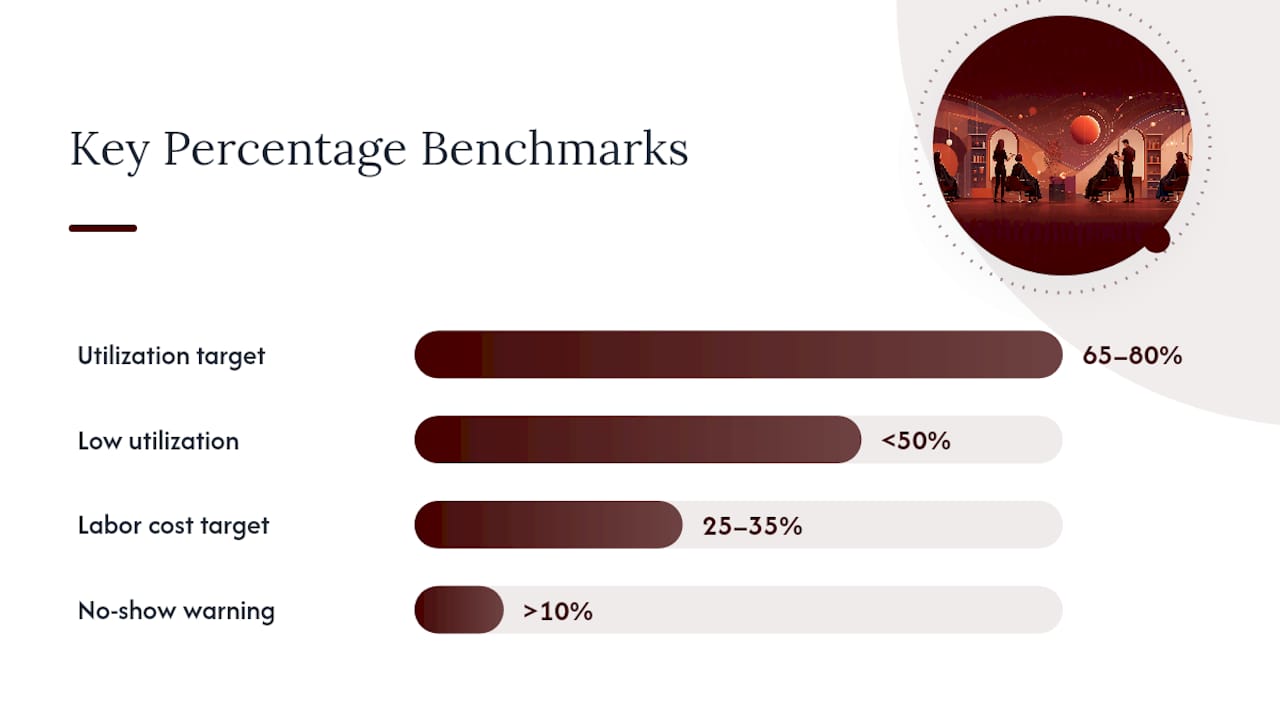
- Maintaining a utilization rate between 65% and 80% is ideal, with anything below 50% indicating potential staffing or booking hygiene issues requiring immediate attention.
- Incorporating space and equipment bottleneck assessments, especially sinks and treatment rooms, can significantly boost capacity without expanding square footage.
- Long-term planning for seasonal peaks, along with deposit requirements and waitlists, minimizes the impact of no-shows and last-minute cancellations on revenue.
- Using integrated, AI-driven platforms that automate data collection and provide real-time insights enhances capacity management and supports efficient scheduling decisions.
Table of Contents
- What Is Salon Capacity Planning, Exactly?
- Key Metrics and Benchmarks Every Salon Owner Must Track
- How to Build a Demand Heatmap Step by Step
- Scheduling Models and Rostering Tactics: Core vs. Flex Staffing
- Service Menu Hygiene: Durations, Processing Windows, and Bundling
- Space and Equipment Utilization: Layout Tweaks That Free Capacity
- Managing Peaks and Seasonal Demand 60 to 90 Days Out
- Operational Monthly Rhythm: A Compact Audit Checklist
- Tools, Integrations, and What an Industry-Focused Platform Should Do
- Contingency Planning for No-Shows and Cancellations
- Staff Skill Matching to Demand Patterns
- Client Flow Management Techniques
- Incorporating Safety and Health Regulations in Capacity Planning
- What Owners Miss, and Three Quick Wins
- How LumariPRO Turns Your Heatmap Into a Revenue Plan
- Sources
- FAQ
What Is Salon Capacity Planning, Exactly?
Salon capacity planning is the process of matching your available chair, room, and staff hours to actual client demand, rather than to a schedule someone built two years ago and never revisited. Industry consultants sometimes call the same discipline “salon resource management” or “demand-based scheduling,” and you’ll hear all three phrases used interchangeably in trade coverage. Whatever you call it, the goal is the same: stop treating your open hours as fixed overhead and start treating them as inventory you either sell or lose.
That reframing matters more than most owners realize. A salon with six chairs open 10 hours a day has 60 chair hours of inventory. Every hour that goes unbooked is inventory that expired unsold, exactly like a hotel room that goes empty on a Tuesday night. Asandra Spa Lounge built its growth strategy around this exact idea, borrowing revenue-management tactics from travel and hospitality, treating every service hour as something to actively sell rather than passively hope fills up. The business grew to multiple locations running on that logic.
Key Metrics and Benchmarks Every Salon Owner Must Track
Utilization is the number that decides your revenue ceiling before pricing ever enters the conversation. The formula is simple: Booked Chair Hours ÷ Available Chair Hours × 100. If a stylist is scheduled for 8 hours and books 5.5 of them, that’s 68.75% utilization for the day.
Benchmarks make the number mean something. Zenoti’s salon revenue research puts median salon utilization around the midpoint of available capacity, while top performers run between roughly three-quarters of available capacity. That gap between median and top isn’t a rounding error. It’s the difference between a salon scraping by and one with a waitlist.
Quick benchmark check: Utilization targets in the 65 to 80% range signal healthy capacity, according to industry chair-utilization calculators. Anything below 50% usually means either your staffing is misaligned with demand or your booking hygiene has gaps eating your schedule.
Other numbers worth pulling monthly:
- Revenue per available hour (total service revenue ÷ total chair hours open) tells you how well you’re monetizing your physical footprint, peak or slow.
- Revenue per booked hour isolates pricing and upsell performance once a client is already in the chair.
- Labor cost as a percentage of service revenue should generally sit in the 25 to 35% range for most independent salons, though commission structures shift that math.
- No-show rate above 10% signals a booking-hygiene problem, not bad luck.
- Rebooking rate at checkout is often the cheapest lever you have for filling next month’s calendar before it opens.
To calculate booked versus available chair hours quickly, pull your booking software’s daily report, sum the scheduled service minutes per chair, and divide by the total minutes each chair was staffed and open. Do this for a single representative week before you commit to any schedule change. It usually takes less than 30 minutes and it’s the fastest way to know whether you have a demand problem or a scheduling problem.
How to Build a Demand Heatmap Step by Step
A demand heatmap is just your booking history sorted by day and hour so the pattern becomes visible instead of anecdotal. Owners who “feel” busy on Thursdays often discover the heatmap tells a different story once cancellations and no-shows are factored in properly.
- Pull three to six months of booking data, including canceled and no-show appointments, not just completed ones. Demand-based scheduling depends on this window because anything shorter gets skewed by a slow week or a single promotion.
- Bucket every appointment by day of week and hour block. A simple spreadsheet with days across the top and hourly rows down the side works fine. One practical build guide notes that three months of appointments mapped this way often exposes obvious schedule fixes in under an hour.
- Convert raw bookings into occupancy percentages, not counts. Ten bookings at 10 a.m. across five chairs means something different than ten bookings across two chairs.
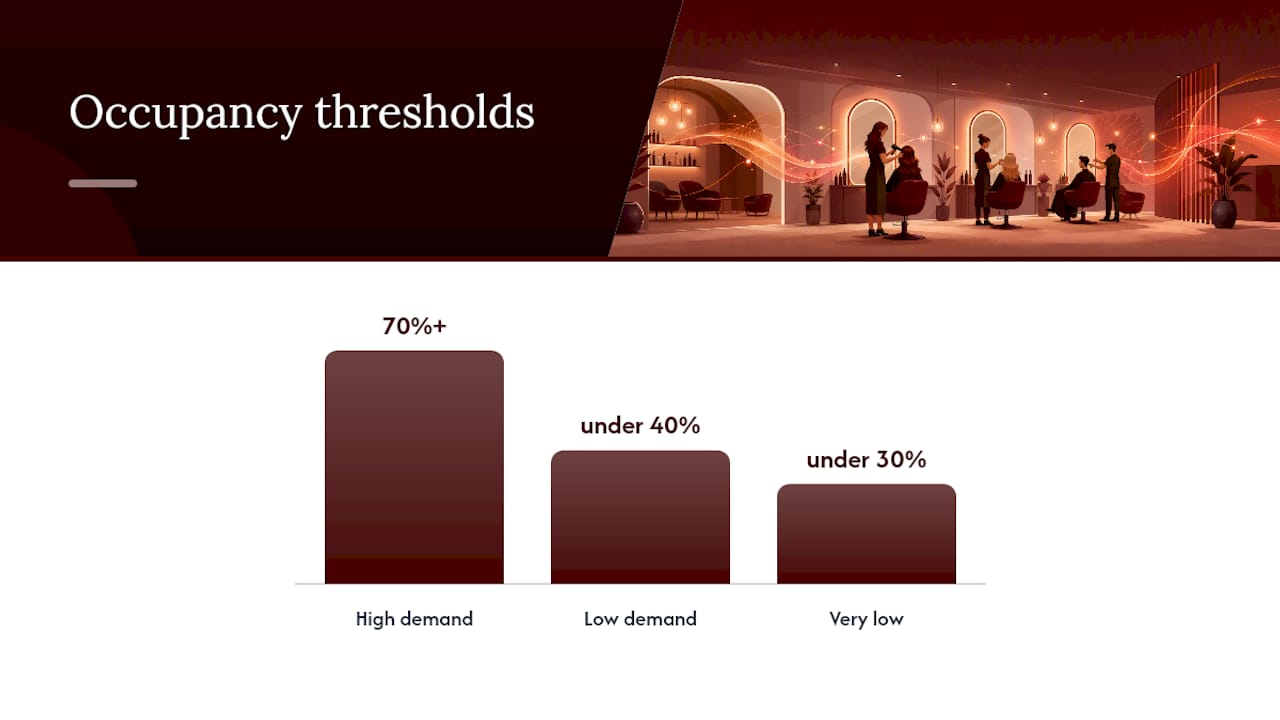
- Color-code the grid. Dark cells for 70%+ occupancy, light cells for anything under 40%. The dead zones and the choke points jump out immediately.
- Cross-reference against turned-away requests if your booking system logs them. Those are demand signals hiding in plain sight, often bigger than the no-show problem owners obsess over.
- Use the map to redesign hours, not just staffing. If Monday mornings are consistently under 30% and Saturday afternoons are consistently overbooked, that’s a case for shifting your open hours, not just your roster.
Pro Tip: Run the heatmap exercise on paper or in a basic spreadsheet before you buy any new software. The insight comes from the data pattern, not the tool, and you’ll make a much smarter software decision once you know what you actually need it to solve.
Once the map exists, three moves usually follow. Stagger stylist start times so the first chair opens 90 minutes before your loudest hour, not at the same time as every other chair. Protect your highest-demand slots for your highest-ticket services instead of first-come-first-served.
Scheduling Models and Rostering Tactics: Core vs. Flex Staffing
Most salons run better on a hybrid staffing model than a uniform one. Core staff are the stylists and technicians scheduled every week regardless of demand fluctuation, the people who anchor your baseline service capacity. Flex staff are booked or scheduled specifically against demand spikes your heatmap identifies, whether that’s a part-timer who only works Friday and Saturday or a colorist who picks up extra chair time during holiday weeks.
Sizing peak coverage against your heatmap, not your intuition, is where most owners get it wrong. If Saturday, between 10 a.m. and 2 p.m.
Role-based rostering prevents the specific kind of idle time that hides inside a busy-looking schedule. A colorist standing around during a blowout rush isn’t “covered,” they’re expensively parked. Match staffing granularity to service type:
- Schedule blowout and styling specialists in overlapping short blocks during known rush windows.
- Keep color and chemical services staffed steadily through the day since processing time naturally spreads demand out.
- Cross-train where you can, so a slow color day doesn’t strand a specialist with nothing to do.
- Build in one buffer role per shift, someone who can take walk-ins, retail consults, or overflow bookings.
Your pay model shapes how much scheduling risk you can absorb. Commission-based stylists carry more of the demand risk themselves, since an empty chair costs them directly, which makes flexible or on-call scheduling easier to introduce. Hourly staff shift that risk onto the business, so overstaffing a slow Tuesday hits your labor cost percentage directly. Many salons blend the two, hourly for support roles and reception, commission or hybrid for service providers.
Pro Tip: Publish the schedule three to four weeks out instead of one. Scheduling research from the beauty industry consistently links longer lead times to fewer call-outs and better staff retention, because people can plan their lives around a schedule they trust instead of scrambling every Sunday night.
Service Menu Hygiene: Durations, Processing Windows, and Bundling
A booking system is only as accurate as the durations you feed it, and most salons underestimate this by a wide margin. If a balayage is booked at 90 minutes but consistently runs 2 hours and 15 minutes, every appointment after it starts late, and your afternoon slowly bleeds capacity you never see on the schedule itself.
- Audit your top ten services against actual completion times, not the durations set when the menu was built. Pull the last 60 days of appointments and compare scheduled versus actual finish times.
- Rebuild durations to include full processing time, not just active stylist time. Precise duration setting is one of the highest-leverage fixes available, because it prevents the cascading lateness that erodes an entire day’s utilization.
- Create bundles for common combinations (cut plus color, color plus gloss) with their own accurate combined duration and a small price incentive, since bundled bookings are easier to schedule around than two separate appointments squeezed in back to back.
- Set lead times by complexity. A simple trim can book same day; a complex color correction should require 48 to 72 hours of lead time so you can staff it properly.
- Mark stylist availability during processing windows for short add-on services. This is the fix owners skip most often, and it’s costly to skip.
That last point deserves emphasis. Marking a stylist as available for quick services during a color’s processing window can recover several extra short appointments per stylist per day. Across a five-person team working five days a week, that’s potentially 50 to 100 extra bookable slots a week that your current schedule is simply throwing away.
Space and Equipment Utilization: Layout Tweaks That Free Capacity
Chairs get the attention, but shampoo sinks and treatment rooms are usually the real bottleneck. A salon with eight styling chairs and two sinks can only run as many chemical or wash-heavy services simultaneously as the sinks allow, no matter how many chairs sit empty and ready.
Start by auditing available chair and room hours against actual bookings for a full week. Compare not just chairs to bookings, but sinks and treatment rooms to the services that require them. You’ll often find the chair utilization number looks fine while the sink utilization number is quietly capping your whole day.
Before you confirm any capacity number to your team or to clients, run a footprint map: walk the physical space at your busiest hour and note where people actually stand, wait, or bottleneck. It’s a five-minute exercise that reveals things a spreadsheet can’t.
Common fixes that don’t require construction or new equipment:
- Stage color prep at a station away from the sink so the sink itself isn’t blocked during mixing.
- Run parallel prep, having an assistant start a client’s wash while the primary stylist finishes the prior appointment, instead of one strict handoff.
- Convert one underused storage or retail corner into a second quick-service station during peak hours.
- Reassign one treatment room to double as overflow chair space during hours your heatmap shows chronic overbooking.
None of this changes your lease or your square footage. It changes how the square footage gets used during your busiest 90 minutes of the week, which is usually where the real capacity is trapped.
Managing Peaks and Seasonal Demand 60 to 90 Days Out
Holiday weeks, prom season, and wedding season aren’t surprises. They show up on your heatmap every single year, which means the planning window should start 60 to 90 days before the spike, not two weeks before.
Pre-schedule your flex staff for known peaks that far out, while their calendars are still open. Waiting until three weeks before a holiday rush to ask a part-time colorist for extra hours means competing with every other salon in town for the same limited pool of available talent.
Deposits and waitlists protect your premium slots from the demand spike itself. A refundable or partially refundable deposit on high-ticket services during peak windows filters out casual bookers and reduces the no-show rate that otherwise wastes your scarcest hours. A structured waitlist, rather than a first-come voicemail system, lets you fill last-minute cancellations with clients who actually want that exact slot.
Sequence your marketing after your staffing plan, not before it. A holiday promotion that drives bookings into a week you haven’t staffed for creates the exact operational chaos that damages a salon’s reputation more than a quiet week ever would.
A few tactics worth testing in shoulder periods:
- Offer a modest midweek discount on services that otherwise sit at low occupancy, rather than discounting your already-busy Saturday.
- Bundle a slower add-on service with a popular one at a small combined discount to lift ticket size during a lull.
- Test one pricing change at a time and measure the utilization shift over two to three weeks before rolling it out further.
Operational Monthly Rhythm: A Compact Audit Checklist
Capacity planning isn’t a one-time project. It’s a monthly habit, and the audit itself takes less time than most owners expect once the routine is set.
Run this checklist on the same day every month, ideally right after you close the books:
- Pull booking demand data by day and hour for the past 30 days and refresh the heatmap.
- Compare current staff coverage against that demand and flag any hour block where staffing and bookings don’t match.
- Review labor cost as a percentage of service revenue, and check overtime hours against the prior month.
- Collect next month’s availability and preferences from staff before building the new schedule template.
- Confirm no-show and rebooking rates haven’t drifted from target.
Benchmark reminder: Keep labor cost in the 25 to 35% of service revenue range and treat utilization below the 65 to 80% healthy band as your trigger to investigate, not just note and move on.
Track utilization and no-show rate weekly since they shift fast. Save labor cost percentage and rebooking rate for the monthly review, since they need a full cycle of data to read accurately. A sequenced approach, fixing utilization before touching pricing or memberships, keeps you from making pricing decisions on top of a schedule that’s still leaking hours.
Tools, Integrations, and What an Industry-Focused Platform Should Do
Booking software, point-of-sale data, and accounting records usually live in three different systems that don’t talk to each other, which means owners rebuild the same utilization math by hand every month. Centralizing that data isn’t a convenience feature. It’s the difference between a real-time utilization number and a stale one you calculated three weeks ago from memory.
A platform built for this workflow should give you a few specific things:
- Automatically generated demand heatmaps pulled straight from booking history, not manually built in a spreadsheet every quarter.
- Automated waitlist management that fills cancellations without a front-desk person working the phones.
- Deposit automation tied to specific services or time windows, so premium peak slots are protected without manual policy enforcement.
- Per-staff utilization dashboards that show booked versus available hours by person, not just by the salon as a whole.
This platform connects to POS systems and QuickBooks to pull real financial and booking data into one dashboard, replacing the manual spreadsheet reconstruction most independent owners do every month. Its AI-powered coaching and business playbooks are designed specifically for suite-based and independent beauty professionals, rather than adapted from generic retail or restaurant software.
If you’re evaluating any vendor for this job, generic or specialized, run it against a short checklist before you commit: Can it export raw booking data without a support ticket? Does it break utilization down per staff member, not just salon-wide? Does waitlist automation actually fill slots, or just log requests? A tool that fails any of those three usually isn’t ready to run your capacity planning.
Contingency Planning for No-Shows and Cancellations
No-shows and late cancellations are a capacity leak, not just a lost sale. A missed 90-minute color appointment isn’t just missed revenue, it’s 90 minutes of chair time that likely can’t be resold on short notice.
Build a tiered response instead of treating every no-show the same. For first-time offenses, a friendly follow-up and a reminder of policy usually suffices. For repeat offenders, require a deposit or a card on file before the next booking, and enforce a cancellation window, generally 24 to 48 hours, that gives you a real chance to fill the slot.
Multi-touch reminders, sent by text and email at staggered intervals before the appointment, meaningfully cut no-show rates compared to a single reminder or none at all. Pair reminders with deposits on your highest-value services specifically, since that’s where a no-show costs the most.
Keep a short internal waitlist active at all times, not just during known peak seasons. A same-day cancellation filled from a standing waitlist recovers revenue that would otherwise vanish. Track your no-show rate monthly alongside utilization.
Staff Skill Matching to Demand Patterns
Not every hour of demand needs every skill on your team, and scheduling as if it does wastes both payroll and talent. Your heatmap tells you when demand spikes; your service mix tells you what kind of demand it is.
If Saturday mornings run heavy on quick cuts and blowouts but light on color, staffing three colorists for that window is expensive idle time, even if the chairs themselves are full. Cross-reference your heatmap against a service-type breakdown, not just raw appointment counts, before finalizing who works which shift.
This also applies to experience level. A junior stylist can absolutely handle a Tuesday afternoon lull, building speed and confidence on lower-stakes bookings. Your most senior colorist should be anchoring your highest-demand, highest-ticket windows, not covering a slow shift where their skill is underused relative to their cost.
Review this match quarterly, not just once when you hire. Demand patterns shift with seasons, local competition, and your own marketing, and a skill match that worked in spring can be badly misaligned by fall. The goal isn’t just having enough hands on deck. It’s having the right hands on deck for what’s actually walking through the door that hour.
Client Flow Management Techniques
Client flow is what happens between “booked” and “checked out,” and a schedule that looks perfect on paper can still fall apart if the physical flow through your space is clumsy.
Stagger arrival times deliberately so your front desk isn’t checking in three clients at once while a fourth waits. A five-minute offset between similar appointment start times smooths this dramatically without changing your total daily capacity.
Build a clear handoff protocol between stations, especially for multi-step services like color that move a client from chair to sink to processing area and back. Every handoff that isn’t planned becomes a place where a client sits waiting and a station sits idle simultaneously, which is the exact double loss capacity planning is meant to prevent.
Use your checkout moment deliberately. It’s your best rebooking opportunity, and a rebooked client fills next month’s calendar before it’s even public, which is one of the cheapest ways to protect future utilization. Train front-desk staff to offer the next appointment before the client reaches for their wallet, not after.
Watch your waiting area, literally. If clients are regularly waiting more than 10 minutes past their scheduled time, that’s a flow problem upstream, usually a duration or staffing mismatch your heatmap can help pinpoint.
Incorporating Safety and Health Regulations in Capacity Planning
Capacity planning doesn’t happen in a vacuum separate from state cosmetology board rules, and treating them as separate concerns is how salons end up with a schedule that looks efficient on paper but violates licensing or safety requirements in practice.
Most states set minimum square footage and ventilation requirements per station, particularly for chemical services, and some set specific spacing requirements between stations. Before you convert an underused corner into a second quick-service station, confirm it meets your state board’s spacing and ventilation rules, not just your own sense of available floor space.
Sanitation and processing protocols also limit how tightly you can actually stack appointments, regardless of what your booking software allows. A chemical service with a mandated processing or patch-test window can’t be compressed just because your heatmap shows unmet demand in that hour. Build your durations around the regulatory minimum first, then layer efficiency gains on top of that floor, never below it.
Staff certification requirements factor into your skill-matching plan too. A service that legally requires a licensed cosmetologist rather than an apprentice can’t be covered by whoever happens to be free that hour, no matter how the heatmap reads. Keep a simple reference of which services require which license level, and check your rostering against it before you finalize any schedule built purely around demand data.
What Owners Miss, and Three Quick Wins
Most resistance to schedule changes isn’t about the data. It’s about how the change gets introduced. Walk your team through the heatmap itself before you announce a new schedule, and show them the actual numbers behind a Tuesday closure or a staggered Saturday start. People accept changes built on evidence far more readily than changes that arrive as an unexplained edict.
Three things you can do this week without buying anything: publish next month’s schedule now, three to four weeks out instead of one. Adjust one single role, maybe your busiest stylist’s start time, to match your heatmap’s actual peak instead of the salon’s traditional open time. And add a deposit requirement to just your highest-ticket service category, nothing else.
None of this requires overhauling your whole operation at once. It requires balancing staff predictability, the thing that keeps good people from leaving, against business needs, the thing that keeps the lights on. The salons that get this right treat both as non-negotiable, not one at the other’s expense.
— Oliver
How LumariPRO Turns Your Heatmap Into a Revenue Plan
Every strategy in this guide comes down to one job: turning chair hours you already have into revenue and a schedule your team can trust. That’s harder to do by hand every month than it sounds, and it’s exactly the gap LumariPRO was built to close for suite renters and independent beauty professionals.
LumariPRO centralizes your booking data, POS reports, and QuickBooks records into one dashboard, so the heatmap and utilization numbers covered above update automatically instead of requiring a manual spreadsheet rebuild every month. Its AI-powered coaching and business playbooks are built specifically around the realities of running a solo or suite-based beauty business, pricing, booth economics, and client retention, rather than borrowed from retail or restaurant software that doesn’t know the difference between a blowout and a balayage.
If you want to see what improved utilization is actually worth in your own chair hours, run your numbers through the ROI calculator. To see the full platform, including the coaching and playbooks referenced throughout this guide, visit the LumariPRO platform page and start with your own demand heatmap this week.
Sources
- Asandra Spa Lounge’s Profitable Approach to Capacity Planning | Salon Today
- Staff Scheduling for Salons & Spas: Optimizing Coverage & Productivity | Rework Resources
- Salon Revenue Management Guide (2026) | Zenoti
- Hair salon chair utilization calculator | BizMetricsHQ
- Salon Scheduling Best Practices (2026) | SchedulingKit
FAQ
How do you perform capacity planning for a salon?
Pull three to six months of booking data, build a demand heatmap by day and hour, then match your staffing and hours to that pattern instead of a fixed traditional schedule. Track utilization rate weekly and adjust core versus flex staffing as the heatmap shifts with the seasons.
How do I attract more customers to my salon?
Filling your calendar with new clients matters less than filling it with the right clients at the right hours.
What is the failure rate of hair salons?
Salon failure is commonly tied to thin margins and poor scheduling economics rather than lack of client demand. Tracking utilization, labor cost percentage, and no-show rates monthly is one of the more direct ways owners catch a slide toward failure early enough to correct it.
How many square feet does a one-person salon or suite need?
Requirements vary by state cosmetology board, but many suite setups run in the range of 100 square feet per station once you account for a chair, a small retail display, and required clearance around the station. Always confirm the exact minimum with your state board before signing a lease.
Recommended