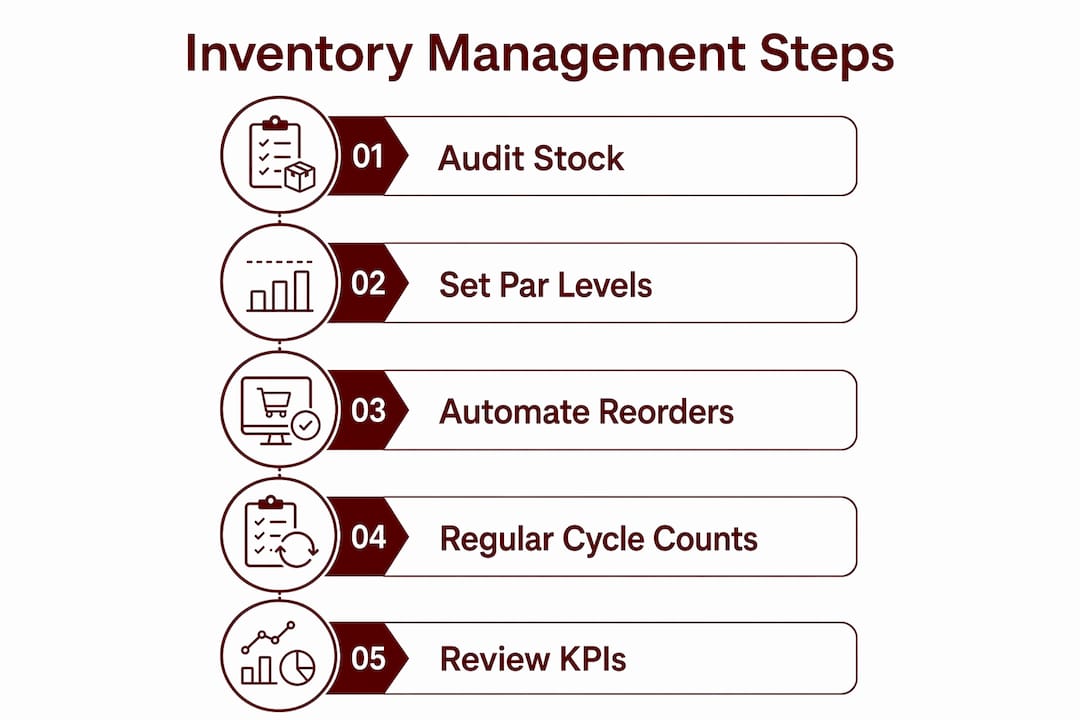
Audit your stock, set par levels, and automate reorders. That single sequence, done once and maintained weekly, is what separates salons that run out of color mid-appointment from those that consistently convert retail at the chair. Within 48 hours: count every backbar and retail SKU on hand, identify your three fastest-moving items, and assign a temporary par level of two weeks’ supply for each. Then evaluate Lumaripro as the platform to run the full system, because generic business tools were not built to understand service recipes, booth rental economics, or the difference between a backbar and a retail shelf.
Table of Contents
- What does a 60-day salon inventory recovery plan look like?
- How to categorize salon inventory the right way
- How do cycle counts and full audits actually work in a salon?
- How do you set par levels and run a clean purchase order process?
- What should you require from salon inventory software?
- SOPs and templates that make inventory stick
- Which KPIs actually tell you if your inventory system is working?
- What are the most common inventory mistakes salons make?
- How to handle expired, damaged, and returned inventory
- Key Takeaways
- What actually changes when inventory becomes a discipline
- Lumaripro gives salon owners the inventory system their business actually needs
- Useful sources and templates
What does a 60-day salon inventory recovery plan look like?
You do not need a full system overhaul on day one. You need a clear sequence, role assignments, and a few non-negotiables each week. Here is a timeline that works for single-location owners and multi-location managers alike.
- Day 1–3: Quick audit. The owner or manager counts all backbar and retail stock by category. No software required yet. A clipboard and a spreadsheet are enough to establish a baseline.
- Day 4–5: Assign roles. Designate who owns counts (manager or senior stylist), who raises purchase orders (owner or manager), and who receives deliveries (front desk or manager). Write it down.
- Day 6–7: Fix critical storage. Label every shelf. Separate retail from backbar physically. Identify any expired or unlabeled product and quarantine it.
- Week 2: Set temporary par levels. Use two weeks of estimated usage as your starting par for each SKU. Adjust after your first real count cycle.
- Week 3–4: Choose and configure software. Evaluate platforms, input your SKU list, and run your first digital cycle count. Train front desk and stylists in one 15-minute session.
- Month 2: Run your first full reconciliation. Compare physical counts to system records. Investigate variances. Refine par levels based on actual usage data, not estimates.
Good salon supply tracking becomes a 10-minute daily discipline once the system is set up, not a recurring administrative burden.
How to categorize salon inventory the right way
Most stock problems start here. When backbar and retail live in the same mental bucket, counts are wrong, reorders are wrong, and profit analysis is impossible. Five categories cover every item in a typical salon.
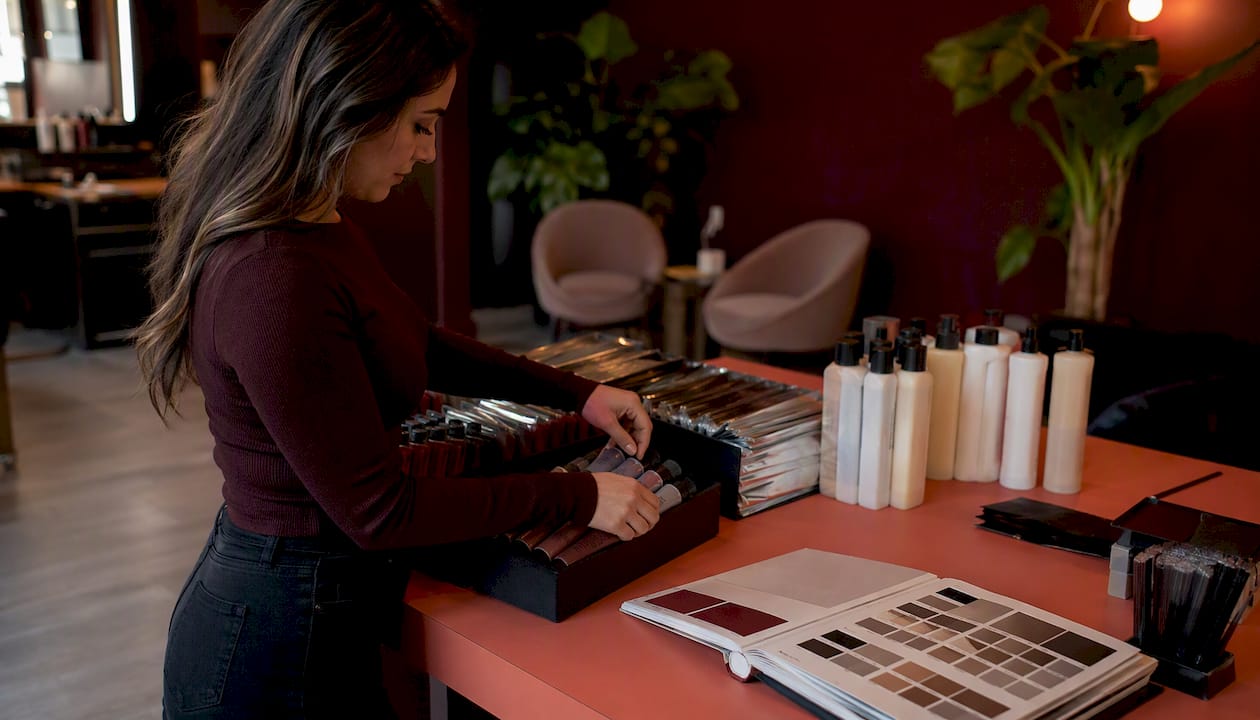
Backbar (professional-use products)
These are the products stylists apply during services: color, developer, toner, shampoo, conditioner, and treatment products. They are consumed in the service and never sold to clients. Track by unit (tube, liter, bottle) and count weekly or bi-weekly because usage is high and variance here directly affects your cost of goods.
Retail (client-sale products)
Retail stock lives on the shelf and generates direct revenue. Track it by SKU, with a separate count from backbar. Retail shrinkage (theft, breakage, tester depletion) is common and easy to miss when retail and backbar are counted together.
Color and tint by shade
Color deserves its own sub-category because it is tracked by shade and tube weight, not just unit count. Partial tubes are a real tracking challenge. The practical rule: log a tube as “open” when it is first used, and count remaining weight or volume at each cycle. Some salon software handles this with a partial-use field; if yours does not, a simple notation on the count sheet works.
Consumables and disposables
Foils, gloves, cotton strips, mixing bowls, and applicator brushes fall here. These are high-velocity, low-cost items. Count monthly rather than weekly, and set generous par levels to avoid mid-service shortages.
Testers, demo items, and tools
Testers are retail units opened for client sampling. They should be labeled with an open date and rotated out after 90 days. Tools (scissors, clippers, styling irons) are tracked as assets, not consumables. Log them once at purchase, note condition at quarterly audits, and record any replacements.
Pro Tip: Label every tester with a small sticker showing the open date. A tester that has been open for six months is a hygiene and liability issue, not just a shrinkage problem.
How do cycle counts and full audits actually work in a salon?
Cycle counting is the right default for most salons. A full-day stocktake is disruptive and unnecessary when you have a rotating count schedule that keeps the database current.
Cycle-count SOP
- Assign one category per count session (e.g., backbar on Monday, retail on Thursday).
- Count during a low-traffic window: before opening or between appointments, not during a rush.
- Use a printed or digital count sheet listing every SKU in that category with the last recorded quantity.
- Record the physical count next to the system quantity. Do not adjust the system until the count is complete.
- Submit the sheet to the manager, who reviews variances before approving any adjustments.
- Log the reason for every manual adjustment. “Breakage,” “expired,” “theft suspected,” and “entry error” are four different problems that require four different responses.
Mobile scanning and logging who adjusted stock, along with the reason, lets managers see shrinkage causes instead of guessing. That audit trail is what separates a disciplined operation from one that just hopes the numbers are right.
When to run a full count
Schedule a full physical count twice a year, ideally in January and July when appointment volume is lower. Close the salon for a half-day or run the count before opening. A full count is also warranted after a suspected theft, a supplier delivery error, or a system migration.
Variance thresholds and escalation
Investigate any variance greater than 5% of expected quantity for a given SKU, or any single-item discrepancy of three or more units. Smaller variances in low-cost consumables can be noted and monitored. Larger variances in color or retail products need a root-cause conversation with the team before the next count.
Pro Tip: Run your first cycle count on your top five revenue-generating color lines. Those are the SKUs where a stockout costs you the most, and where shrinkage is most likely to hide.
How do you set par levels and run a clean purchase order process?
Par levels are the minimum quantity you want on hand before placing a reorder. Get this wrong and you are either over-ordering (cash tied up in stock) or running out (lost service revenue and frustrated clients).

The par-level formula
A simple formula that works for most salon SKUs:
Par level = (Daily usage × Lead time in days) + Safety stock
A short example: if you use three tubes of a color shade per day, your supplier takes four days to deliver, and you want two days of safety stock, your par level is (3 × 4) + (3 × 2) = 18 tubes. When stock drops to 18, you reorder.
Adjust this number every 60 days using actual usage data from your system. Seasonal demand (holiday color services, summer highlights) will push par levels up; slow months pull them down.
PO workflow checklist
- Stylists or the manager flags low stock in the system or on a shared reorder sheet.
- Manager reviews the reorder request and confirms it against current par levels.
- Owner approves POs above a set dollar threshold (e.g., any order over $200).
- Front desk or manager places the order with the supplier and logs the PO number in the system.
- On delivery, the receiving person matches items and quantities to the PO before putting anything on the shelf.
- Any discrepancy between the PO and the delivery is flagged to the manager before the invoice is approved.
Centralized ordering with supplier tracking reduces manual entry and speeds up receiving. Integrating suppliers directly into your ordering workflow cuts rekeying errors and makes the receiving step faster.
Handling promotions and seasonal buys
When a supplier runs a promotion, calculate whether the bulk discount offsets the carrying cost of extra stock. A 20% discount on a product you turn over every 30 days is worth taking. A 20% discount on a slow-moving retail SKU that sits for 90 days is usually not. For seasonal spikes, increase par levels four to six weeks before the busy period, not the week before.
Pro Tip: Never adjust par levels based on a single week’s usage. Use a rolling four-week average to smooth out the noise from a slow week or a one-off event.
What should you require from salon inventory software?
The feature list matters less than whether the software actually fits how a salon operates. Service recipes, mobile counting, and a real POS sync are the three things that separate a salon-specific tool from a generic inventory app.
Feature checklist
| Feature | Must / Should / Can |
|---|---|
| Real-time stock updates on checkout | Must |
| Service recipes (auto-deduct per service) | Must |
| Mobile barcode scanning for counts | Must |
| PO management and supplier tracking | Must |
| Audit trail (who changed what and why) | Must |
| POS real-time sync | Must |
| QuickBooks or accounting export | Should |
| Multi-location ledger and transfers | Should |
| Role-based location access | Should |
| Offline counting mode | Should |
| Automated low-stock alerts | Should |
| Tester and expiry date tracking | Can |
| Supplier catalog integration | Can |
Service recipes are the feature most salons overlook. When your POS knows that a balayage service uses 60g of lightener and 30ml of developer, it deducts that stock automatically on checkout. Without recipes, every stylist is manually logging usage, and most of them are not.
Integration items to verify before you buy
- POS sync: Does it update stock in real time on checkout, or does it batch-sync overnight? Real-time is the only acceptable answer for a busy salon.
- QuickBooks export: Can it push cost-of-goods data directly to QuickBooks, or does someone have to export a CSV and import it manually?
- Mobile counting: Does the app work offline, or does it require a Wi-Fi connection? Stockrooms often have poor signal.
- Multi-location transfers: Can a manager at Location A request stock from Location B without calling the owner?
- User roles: Can you restrict stylists to logging usage only, while managers approve adjustments and owners see consolidated reports?
Questions to ask vendors during a demo
Ask how service recipes deduct stock when a service is modified mid-appointment. Ask what happens to inventory records if the POS goes offline. Ask how the system handles a transfer between two locations and whether the sending location’s stock updates before or after the receiving location confirms receipt. The answers reveal whether the software was built for salons or adapted from a retail or restaurant tool.
Asking the right POS questions about itemized service recipes, offline syncing, and accounting integration is the fastest way to eliminate tools that will not survive a real salon week.
SOPs and templates that make inventory stick
A system that only the owner understands is not a system. The goal is a set of documents simple enough that a new front-desk hire can follow them on day one.
Count sheet fields
Every count sheet, whether paper or digital, needs these fields:
- SKU or product name
- Category (backbar, retail, color, consumable)
- Unit of measure (tube, bottle, box, each)
- System quantity (pre-count record)
- Physical count
- Variance (system minus physical)
- Reason for variance (if applicable)
- Counter’s name and date
Reorder sheet fields
- Product name and SKU
- Current quantity on hand
- Par level
- Reorder quantity (par level minus current quantity, plus safety stock)
- Supplier name
- Last purchase price
- PO number (once raised)
- Expected delivery date
15-minute staff training checklist
- Minutes 1–3: Show stylists where the count sheets live and how to log a product as “used” in the system or on the sheet.
- Minutes 4–7: Walk through the mobile scanning process for one product category. Have each person scan one item.
- Minutes 8–11: Explain the two rules: never remove product from the backbar without logging it, and always flag a low-stock item to the manager before it runs out.
- Minutes 12–15: Answer questions. Post the count schedule and the reorder sheet location on the staff bulletin board.
Pro Tip: Laminate a one-page “what to do when stock is low” card and tape it inside the backbar cabinet. The fewer steps between noticing a problem and reporting it, the fewer stockouts you will have.
Change management
The biggest source of pushback is not the technology. It is the perception that inventory tracking is surveillance. Frame it as a business protection tool, not a trust check. When stylists understand that a stockout mid-appointment reflects on their professionalism, not just the owner’s planning, compliance improves quickly. Tie the first month’s results to a visible win: “We haven’t run out of X since we started tracking.”
Which KPIs actually tell you if your inventory system is working?
Tracking inventory without measuring outcomes is just counting. These five KPIs tell you whether the system is generating real business value.
KPI formulas
| KPI | Formula | Target |
|---|---|---|
| Inventory turnover | Cost of goods sold ÷ Average inventory value | 8–12× per year for backbar |
| Days of inventory on hand (DOH) | (Average inventory ÷ COGS) | 30–45 days |
| Shrinkage rate | (Expected inventory − Physical count) ÷ Expected inventory | Below 2% |
| Stockout frequency | Number of stockouts per month | — |
| Retail conversion rate | Retail units sold ÷ Total client visits | Varies by salon; track trend |
Expected savings from automation
Automated inventory management can significantly reduce waste from expired or over-ordered products and save a large portion of administrative time compared to manual spreadsheet tracking.
Stat to know: Automated salon inventory systems can cut product waste by approximately 60% and reduce admin time by up to 80% versus manual tracking, according to Suplery.
Connecting inventory to your books
Setting up a clear chart of accounts and tracking income and expenses consistently is the bookkeeping foundation that makes inventory cost accounting meaningful. Without clean books, your inventory turnover ratio is just a number with no context.
KPI review cadence
Review stockout frequency and shrinkage rate weekly. Review inventory turnover and DOH monthly. When turnover drops below 8× annually for backbar, you are over-ordering or sitting on slow-moving stock. When DOH exceeds 45 days, the same problem applies. When shrinkage exceeds 2%, pull the audit trail and investigate before the next count.
What are the most common inventory mistakes salons make?
Most inventory problems are not random. They follow predictable patterns, and each one has a specific fix.
- Relying on memory or visual checks. “I can see there are still a few tubes left” is not a par level. Fix: assign a numeric par to every SKU and count against it.
- Mixing retail and backbar in the same count. When these are combined, shrinkage in one category hides behind movement in the other. Fix: physically separate storage and use separate count sheets.
- Not using service recipes. Without recipes, auto-deduction does not happen, and manual logging is inconsistent at best. Fix: build recipes for your top 10 services first, then expand.
- Counting too infrequently. An annual full count tells you what happened, not what is happening. Fix: start weekly cycle counts on your top-moving categories.
- No audit trail. Without a log of who changed what and why, you cannot separate theft from breakage from entry error. Audit trails let managers diagnose shrinkage causes instead of guessing. Fix: require a reason code for every manual adjustment.
- Ignoring expiry dates. Expired color and chemical products are a liability and a waste. Fix: label every product with its expiry date on receipt and rotate stock first-in, first-out.
- Over-ordering to avoid stockouts. Buying extra “just in case” ties up cash and increases the risk of expiry. Fix: use the par-level formula and trust the data.
10-minute red-flag audit
Ask yourself these questions right now:
- Can you name the par level for your top five color SKUs without looking it up?
- Do you know when you last ran a physical count?
- Is your retail stock physically separated from your backbar?
- Does your system log who made the last manual adjustment to any SKU?
- Have you had a stockout in the last 30 days?
If you answered “no” to three or more, your inventory system needs attention before it costs you a client.
How to handle expired, damaged, and returned inventory
Expired and damaged product is a cost center that most salons underreport. A clear policy prevents both financial loss and safety issues.
Expired product
When a product reaches its expiry date, remove it from active stock immediately and log it as a write-off in your system. Record the product name, quantity, expiry date, and estimated cost. This data feeds your shrinkage rate and helps you identify which SKUs you consistently over-order. If a supplier offers credit for expired stock, file the claim within their stated window, typically 30–60 days from expiry.
Damaged product
Breakage happens. A dropped bottle of toner, a cracked retail unit, a leaking color tube. Log every instance with a reason code (“breakage”) and the quantity lost. Over time, a pattern of breakage in a specific product category points to a storage or handling problem, not bad luck.
Returns to suppliers
Most professional beauty distributors accept returns on unopened, undamaged product within 30–90 days of purchase. Keep your original invoices and PO numbers. When you initiate a return, log it in your system as a negative receipt so your stock count stays accurate. Do not wait until a product has been sitting for six months to ask about a return policy. Ask at the time of purchase.
Client returns
A client who returns a retail product should trigger a system adjustment: remove the unit from “sold” and either return it to retail stock (if unopened and within policy) or write it off. Never silently put a returned product back on the shelf without logging it. That creates a phantom unit in your count.
Key Takeaways
Effective salon inventory management comes down to four disciplines: accurate categorization, regular cycle counts, data-driven par levels, and a software system that auto-deducts stock and logs every adjustment.
| Point | Details |
|---|---|
| Audit first, then set par levels | Run a physical count before setting any par level; estimates without real data produce wrong reorder points. |
| Cycle counts beat annual stocktakes | Weekly category counts keep records accurate without closing the salon or losing a full day of revenue. |
| Service recipes prevent manual errors | Auto-deducting stock via service recipes at checkout removes the single biggest source of inventory inaccuracy. |
| Automation cuts waste and admin time | Automated systems can reduce product waste by about 60% and cut admin time by up to 80% versus spreadsheets, according to Suplery. |
| Lumaripro connects the full system | Lumaripro integrates POS, QuickBooks, and real-time dashboards so salon owners manage inventory, finances, and staff in one place. |
What actually changes when inventory becomes a discipline
There is a version of this conversation that focuses entirely on software features and spreadsheet formulas. That version misses the real shift. The salons that get inventory right are not the ones with the most sophisticated tools. They are the ones where the owner decided, once, that product management is a revenue function, not a back-office chore.
When that decision gets made, a few things follow almost automatically. Retail conversion improves because products are actually on the shelf when a client asks for them. Color costs drop because stylists stop over-mixing to avoid running short. The owner stops spending Sunday nights reconciling a spreadsheet that is already three weeks out of date.
The conventional wisdom says inventory is hard because salons are busy and staff turnover is high. That is true, but it is not the real obstacle. The real obstacle is that most salon owners were trained as artists, not operators, and nobody handed them a system that fits how a salon actually runs. Generic retail inventory tools do not understand service recipes. Generic accounting software does not know what a backbar is. The gap between “we track inventory” and “inventory drives our decisions” is almost always a system problem, not a discipline problem.
The operators who close that gap fastest are the ones who stop trying to adapt a tool built for a restaurant or a retail store and start with something built for the beauty industry from the ground up.
Lumaripro gives salon owners the inventory system their business actually needs
Most salon owners have tried at least one generic tool that almost worked. The POS tracked retail but not backbar. The spreadsheet was accurate for a week. The inventory app had no concept of a service recipe. Lumaripro is built differently, specifically for pro-beauty professionals and suite owners who need their inventory, finances, and operations to talk to each other.

The Lumaripro platform connects directly to your POS and QuickBooks, so stock deductions happen at checkout and cost-of-goods data flows into your books without manual exports. Mobile counts, PO management, service recipes, multi-location ledger, and role-based access are all part of the same system, not separate tools you have to stitch together. Whether you run a single suite, a full-service salon, or multiple locations, the platform gives you real dashboards instead of guesswork.
If you are ready to move from spreadsheets to a system that was built behind the chair, see how Lumaripro works and request a demo to see the full feature set for your operation.
Useful sources and templates
Start with the count sheet before anything else. A simple spreadsheet with the eight fields listed in the SOPs section above is enough to run your first cycle count today.
- Lumaripro platform overview: Full feature list, POS and QuickBooks integration details, and demo request.
- Lumaripro for salon owners: Starting point for owners evaluating the platform, with use cases and pricing context.
- Salon bookkeeping guide (GlossGenius): Practical guidance on setting up a chart of accounts and connecting inventory costs to profit analysis.
- Salon inventory software comparison (Suplery): Independent breakdown of software options with feature comparisons useful for vendor evaluation.
- Salon and spa POS systems guide (Limelight Payments): Covers what to ask POS vendors about service recipes, offline syncing, and accounting integration.
- IRS Publication 538: The IRS guidance on inventory accounting methods (FIFO, LIFO, specific identification) relevant when setting up cost-of-goods tracking for tax purposes.
Download or build your count sheet first. Once you have one week of real count data, par levels become straightforward, and the case for software becomes obvious.
Recommended