A well-built salon service menu lists every category your clients book, with a one-line description, expected duration, starting price, and any product or stylist-level surcharges. Right now, the fastest way to build one is to grab an editable template from Template, Venngage, or MustHaveMenus, then drop in your own services and prices.
Before you open any template, copy this checklist to your desk:
- Service categories (cuts, color, texture, nails, waxing, skincare, bridal, men’s, kids)
- Each service: title, one-line description, duration in minutes, starting price or range, add-on options
- Pricing rules: product charges, hair-length surcharges, stylist-level multipliers, and a booking or cancellation note
That’s the whole skeleton. Everything below shows you how to fill it in.
Key Takeaways
A salon service menu that lists categories, durations, starting prices, and product-charge rules converts browsers into booked clients and protects your schedule from scope creep.
| Point | Details |
|---|---|
| Include duration on every service | Showing expected time reduces booking conflicts and client complaints about appointment length. |
| Use a level-based pricing system | Junior, senior, and master tiers with clear multipliers keep pricing consistent across stylists. |
| Grab an editable template first | Template.net, Venngage, and MustHaveMenus offer print-ready and digital formats you can customize in under an hour. |
| Apply the pricing formula | Time cost + product cost + overhead share + experience multiplier gives you a defensible, consistent price for every service. |
| Lumaripro tracks menu performance | POS and QuickBooks integrations show real revenue per service so you can validate and adjust prices with data. |
Table of Contents
- What every salon service menu should include
- Categorized salon service menu examples with U.S. price ranges
- Where to find editable salon menu templates
- How to write service descriptions and set prices
- Design and formatting tips for print and digital menus
- Lumaripro helps you price, track, and publish your service menu
- Sources
What every salon service menu should include
Structure matters more than design. A menu that lists “Balayage — call for pricing” loses bookings. One that says “Balayage — hand-painted highlights, 2.5–3 hrs, starting at $175, product charge may apply for longer hair” closes them.
Required fields for every service line:
- Service category (group related services together)
- Service title (specific, not vague — “Women’s Haircut & Blowout,” not “Haircut”)
- One-line description (what’s included, what’s not)
- Expected duration in minutes or hours
- Price: fixed, starting price, or a low-to-high range
- Product charge rule (e.g., “extra color product billed at $15–$25”)
- Stylist-level disclaimer (“prices shown are starting prices; senior and master stylists are priced higher”)
- Add-ons and packages (listed separately or as a footer note)
- Booking or cancellation policy note
Grouping order that works: Start with your highest-volume services (cuts, blowouts), move into color and texture, then treatments and add-ons, then specialty categories (bridal, men’s, kids). Put packages and memberships at the end where clients naturally look after scanning the full list. Signature or award-winning services deserve a visual callout, a bold label, or a short “our most popular” tag.
Salon 297’s printable menu shows durations and add-on charges side by side, which is exactly the format that prevents scope creep and keeps your front desk from fielding “how long will this take?” calls all day.
Pro Tip: Add duration estimates to every service, even rough ones. Salons that show expected time reduce booking conflicts and protect their schedule. A client who books a “quick gloss” and expects 20 minutes will be frustrated if the actual service runs 45 — that friction shows up in reviews.
Before you publish, check:
- Every price is current and tested against your actual costs
- Every duration reflects real appointment time, not best-case time
- Legal disclaimers are present for any service requiring a licensed professional (esthetics, chemical services)
- Product charges and surcharges are spelled out, not buried in fine print
Categorized salon service menu examples with U.S. price ranges
The 47 popular salon services list from The Salon Business is one of the most practical blueprints available for building out categories. Below is a copy-ready version organized by service type, illustrating typical U.S. price categories you can adapt.
Haircutting
- Women’s haircut & blowout — cut, shampoo, blowout; typical duration; starting price range appropriate to your market
- Men’s haircut — cut and style; typical duration; starting price range appropriate to your market
- Kids’ haircut (12 and under) — cut and style; typical duration; starting price range appropriate to your market
- Bang trim — between-visit maintenance; typical short duration; starting price range appropriate to your market
- Dry cut — cut on dry hair, no blowout; typical duration; starting price range appropriate to your market
Color
- Single-process color — root-to-tip or root touch-up; typical duration; starting price range appropriate to your market
- Balayage — hand-painted highlights; typical extended duration; starting price range appropriate to your market
- Full highlights — foil highlights throughout; typical extended duration; starting price range appropriate to your market
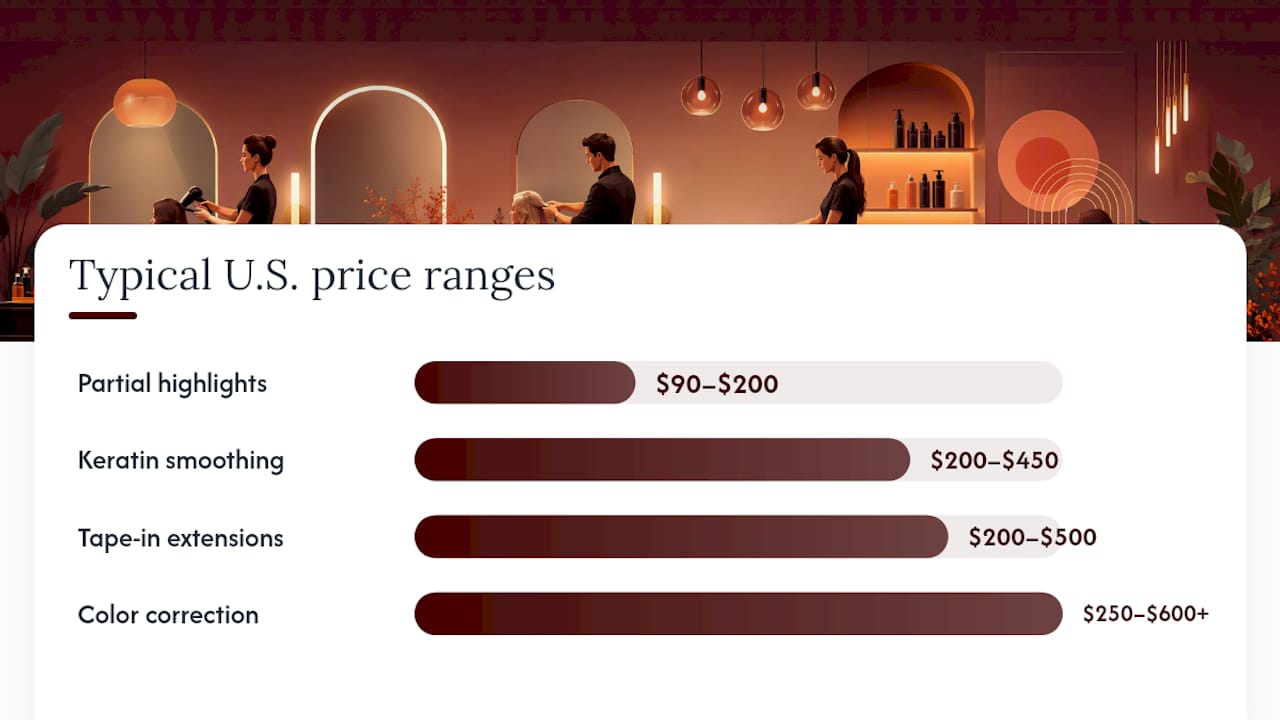
- Partial highlights — foil highlights at crown and face frame; 1.5–2 hrs; $90–$200
- Toner/gloss — color refresh or tone correction; typical short duration; starting price range appropriate to your market
- Color correction — multi-step correction service; 3–6+ hrs; $250–$600+
Styling & blowouts
- Blowout — shampoo, blowdry, and style; typical duration; starting price range appropriate to your market
- Updo/special occasion style — formal styling; typical duration; starting price range appropriate to your market
- Flat iron or curl set — heat styling after blowout; typical add-on duration; starting price range appropriate to your market
Treatments & add-ons
- Deep conditioning treatment — intensive moisture or repair; typical add-on duration; starting price range appropriate to your market
- Scalp treatment — exfoliation or oil treatment; typical add-on duration; starting price range appropriate to your market
- Olaplex treatment — bond-building add-on; typical short duration; starting price range appropriate to your market
- Gloss/shine treatment — color-safe shine boost; typical short duration; starting price range appropriate to your market
Texture services
- Keratin smoothing treatment — frizz reduction, 8–12 weeks; 2.5–3.5 hrs; $200–$450
- Perm — wave or curl service; typical duration; starting price range appropriate to your market
- Relaxer — chemical straightening; typical duration; starting price range appropriate to your market
Extensions (see also extension pricing examples for line-item surcharge formats)
- Tape-in extensions — application; 1.5–2 hrs; $200–$500 (hair cost separate)
- Sew-in/weft extensions — typical duration; starting price range appropriate to your market, hair cost separate
- Extension removal — typical duration; starting price range appropriate to your market
Nails
- Classic manicure — shape, buff, polish; typical duration; starting price range appropriate to your market
- Gel manicure — gel polish application; typical duration; starting price range appropriate to your market
- Classic pedicure — soak, shape, polish; typical duration; starting price range appropriate to your market
- Gel pedicure — typical duration; starting price range appropriate to your market
- Nail art (per nail) — custom design; price varies by design and complexity
Waxing & brows
- Brow wax & shape — typical duration; starting price range appropriate to your market
- Lip wax — typical short duration; starting price range appropriate to your market
- Full leg wax — typical duration; starting price range appropriate to your market
- Brazilian wax — typical duration; starting price range appropriate to your market
- Brow tint — typical short duration; starting price range appropriate to your market
Makeup & lashes
- Full makeup application — event or bridal; typical duration; starting price range appropriate to your market
- Lash lift & tint — typical duration; starting price range appropriate to your market
- Classic lash extensions — full set; 90–120 min; $100–$200
Bridal & event packages
- Bridal hair & makeup trial — typical extended duration; starting price range appropriate to your market
- Wedding-day hair — updo or style; typical duration; starting price range appropriate to your market
- Bridal party pricing — per person; varies by service
Pricing rules to show on your menu:
| Rule | How to word it |
|---|---|
| Product charge | “Extra color product billed at $15–$25 for longer or thicker hair” |
| Hair-length surcharge | “Long hair (past shoulder) adds $10–$20 to cut and blowout services” |
| Stylist-level multiplier | “Prices shown are starting prices. Senior and master stylists are priced higher.” |
| Add-on pricing | “Add a deep conditioning treatment to any color service for $30” |
For add-ons and memberships, place them in a clearly labeled section at the bottom of each category or at the end of the full menu. Wording like “Add to any service” or “Available as a monthly membership” tells clients exactly how to book.
Where to find editable salon menu templates
Template platforms vary more than most owners realize. The right one depends on whether you need a print-ready file today or a digital menu you can update from your phone.
Template.net is the fastest path to a printable menu. Templates download in Word, Google Docs, Apple Pages, and Publisher, so you can open one, swap in your services, and send it to a printer the same day. The free tier covers basic layouts; premium templates run a few dollars each. Best for: owners who need a physical menu card or a PDF for their website.
Venngage is the better pick if you want something that looks like a designer made it. The drag-and-drop editor requires no design experience, and templates are built around brand color palettes and font pairings. Free accounts can create and share; PDF export requires a paid plan (starting around $19/month). Best for: owners building a cohesive brand identity who want a menu that doubles as a marketing piece.
MustHaveMenus focuses on print-ready menu design with optional professional printing and delivery. Templates are restaurant-menu quality, which translates well to salon service cards and lobby displays. The platform handles bleed, trim, and CMYK settings automatically. Best for: owners who want to order printed menus without managing print specs themselves.
iMenuPro offers a gallery of salon menu templates built for digital display, including tablet menus and embeddable web versions. The monthly subscription model means your menu lives online and updates in real time. Best for: salons that want a digital menu on a lobby tablet or linked from a booking page.
Pinterest is not a template tool, but it’s genuinely useful for visual direction. Search “salon service menu design” or “hair salon price list” and you’ll find hundreds of real examples from working salons. Screenshot what you like, then bring those layout ideas into whichever template platform you choose.
Quick workflow: Download a Word or Google Docs template from Template.net. Replace placeholder text with your service names, descriptions, durations, and prices. Export as PDF for print (check that bleed marks are on if your printer requires them). Save a second copy as a standard PDF or image for your website or booking confirmation emails.
How to write service descriptions and set prices
Pricing without a formula is guesswork. Here’s a method that works for U.S. salons at any size.
The pricing formula:
Time cost is your hourly rate multiplied by service duration. If you need to earn $50/hour and a blowout takes one hour, your time cost is $50. Product cost is the actual cost of color, product, or supplies used. Overhead share is your rent, utilities, and software divided across your weekly service count. Experience multiplier is the stylist-level adjustment.
Step-by-step pricing process:
- Audit your current revenue per service. Pull 60 days of booking data and calculate what each service actually earns after product costs.
- Calculate your time cost. Decide your target hourly rate, then multiply by average service duration.
- Add product and overhead margin. Color services typically carry $15–$50 in product cost; add that to the time cost, then add a proportional overhead share.
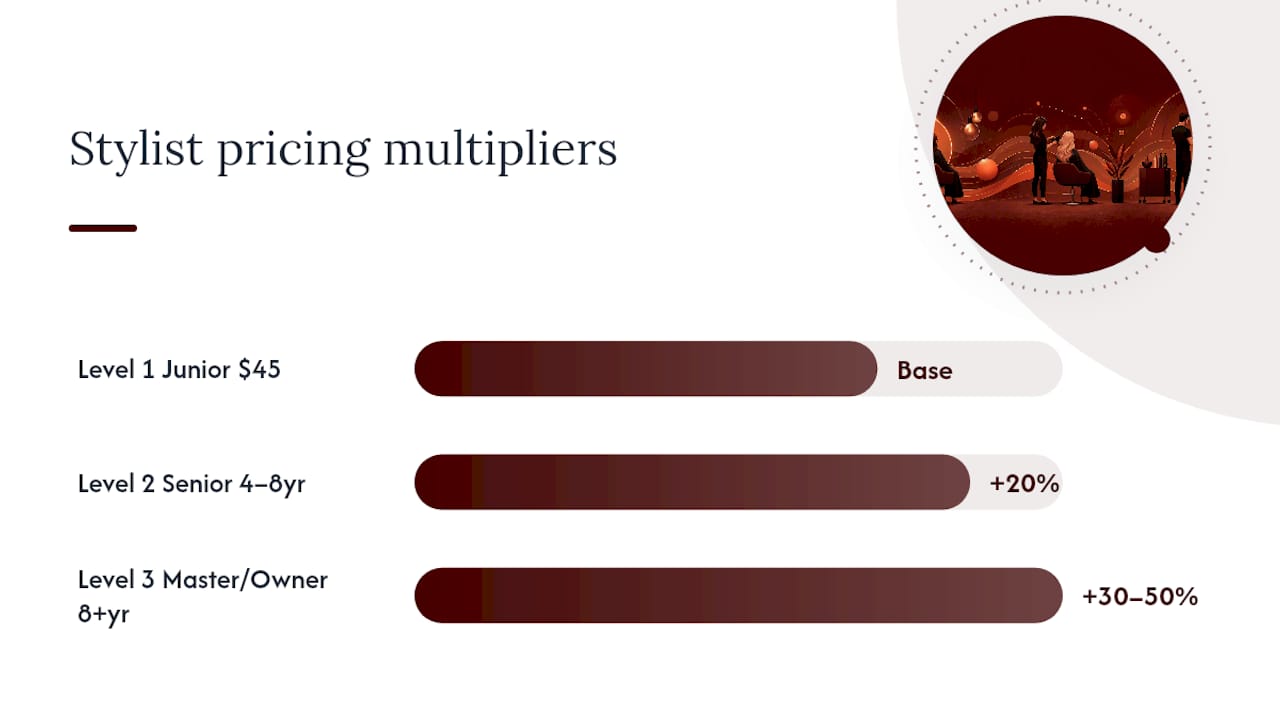
- Set stylist-level multipliers. A junior stylist might start at the base price; a senior stylist adds 15–25%; a master or owner adds 30–50%.
- Test for 30–60 days. Run the new prices, track client retention and revenue per appointment, and adjust.
Sample level-based pricing system (modeled on the approach used by Eau Salon, where listed prices are starting prices and product charges vary by hair length and density):
| Level | Description | Price multiplier | Women’s cut example |
|---|---|---|---|
| Level 1 (Junior) | 1–3 years experience | Base price | Starting at $45 |
| Level 2 (Senior) | 4–8 years experience | Base + 20% | Starting price |
| Level 3 (Master/Owner) | 8+ years, advanced training | Base + 30–50% | Starting price |
Writing service descriptions: Aim for 10–12 words that tell the client what’s included and what to expect. “Shampoo, cut, and blowdry for shoulder-length or shorter hair” is better than “Women’s haircut.” If a service excludes something clients commonly assume is included (like a blowout after a cut), say so.
Pro Tip: Track the actual time each service takes in your POS for 60 days. Most stylists underestimate duration by 10–15 minutes, which compresses the schedule and kills revenue per hour. Lumaripro’s platform integrations connect to your POS and QuickBooks so you can see real service-time data without building a spreadsheet.
Design and formatting tips for print and digital menus
A menu that’s hard to read loses clients before they book. These are the decisions that matter most.
Typography and visual hierarchy:
- Use two fonts maximum: one for headings, one for body text
- Minimum 11pt font for print; 14px for web
- High contrast between text and background (dark text on light, or light on dark — never low-contrast gray on gray)
- Bold service names; use regular weight for descriptions and prices
- Leave white space between categories so the eye can scan
File formats:
- Print: Export as PDF with CMYK color profile, 0.125-inch bleed, and crop marks if your printer requires them. Standard salon menu card sizes are 4×9 inches (rack card) or 8.5×11 inches (full sheet).
- Web: Save a screen-optimized PDF (RGB, compressed) for your website. PNG or JPEG works for social media posts or booking confirmation images. Google Docs or HTML versions are easiest to update without a designer.
QR codes: A QR code on a printed menu card that links to your full online price list or booking page is one of the most practical upgrades you can make. Place it at the bottom of the card with a one-line label (“Scan to book” or “Full price list online”). Tools like QR Code Generator or Canva’s built-in QR feature create one in under two minutes.
Proofing checklist before printing:
- Spell-check every service name and description
- Confirm all prices match your booking system
- Verify duration estimates against your actual appointment blocks
- Round prices to clean numbers ($45, not $43.50) for readability
- Check that product charge and stylist-level notes are present
Accessibility: On web versions, add alt text to any menu image. For printed menus, a large-print version (14pt minimum) available at the front desk costs almost nothing to produce and removes a real barrier for some clients.
The menu detail most owners skip
Most salon owners spend their menu-building time on design and almost none on the transition plan. Here’s what actually matters when you roll out a new or updated menu.
Tell existing clients about price changes before they show up. A short email or text two to three weeks out, explaining what changed and why, prevents the awkward chair-side moment. Clients who feel informed stay; clients who feel surprised don’t.
Use appointment confirmations to restate the service duration. If a client booked a balayage that runs three hours, the confirmation should say “3 hours.” That one line eliminates a significant share of “I didn’t know it would take that long” complaints.
Train your staff on the new wording before the menu goes live. If your menu says “Olaplex bond-building treatment” and your stylist calls it “the Olaplex thing,” the menu loses credibility. A 15-minute team walkthrough of the new language pays off immediately.
Consider a short launch promotion for new menus: a complimentary add-on (scalp massage, gloss treatment) for clients who book within the first two weeks. It rewards loyalty and gets real feedback on how the new menu reads to actual clients.
Lumaripro helps you price, track, and publish your service menu
Most salon owners build their menu once and forget it for two years. The problem is that costs shift, service times drift, and stylist levels change, but the menu doesn’t. That gap costs real money.
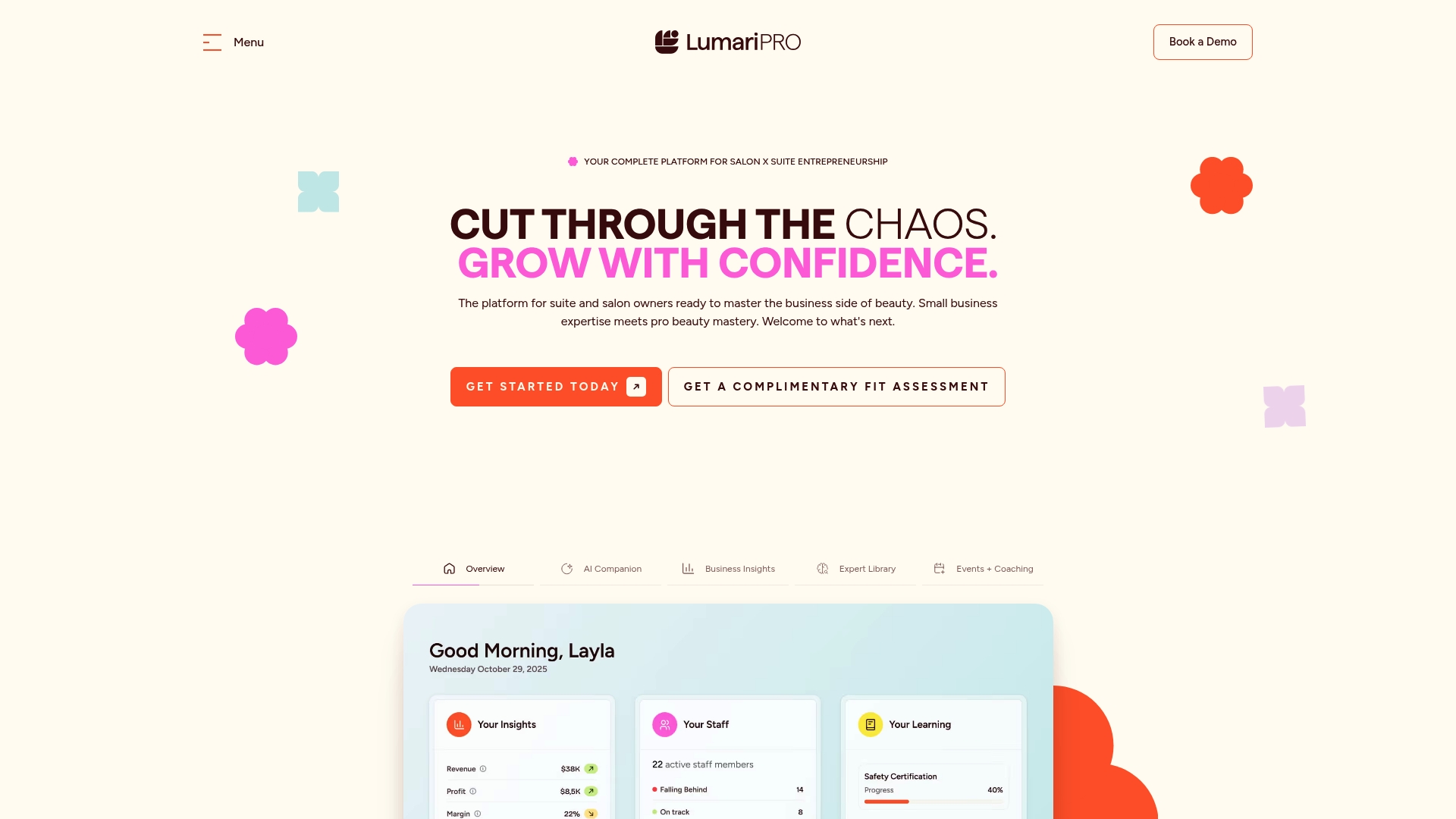
Lumaripro is built for exactly this: independent beauty professionals who need more than a static PDF. The platform’s pricing playbooks and templates give you a structured starting point for your menu, and the POS and QuickBooks integrations pull real revenue-per-service data so you can see which services are actually profitable. When it’s time to update prices or add a new stylist level, you’re working from numbers, not guesses.
The platform also includes business coaching and a peer community of suite owners who’ve already solved the menu and pricing problems you’re working through now. If you want to see how it fits your setup, explore the Lumaripro platform and request a walkthrough.
Sources
- 47 Popular Hair Salon Services (Menu & Price List)
- Printable Salon Menu | Salon 297 & Day Spa
- Template
- Beauty Salon Price List Templates - Venngage
- Price Guide | Eau Salon | Regina
A note on licensing: Some services (chemical treatments, esthetics, nail services) require a state-issued license in the U.S. Check your state’s cosmetology board requirements before listing any service that may require a specific credential or medical disclaimer.
Recommended